


December 17, 2025
When Information Doesn’t Flow Between Shifts – Are You Doing the Same Work Twice?
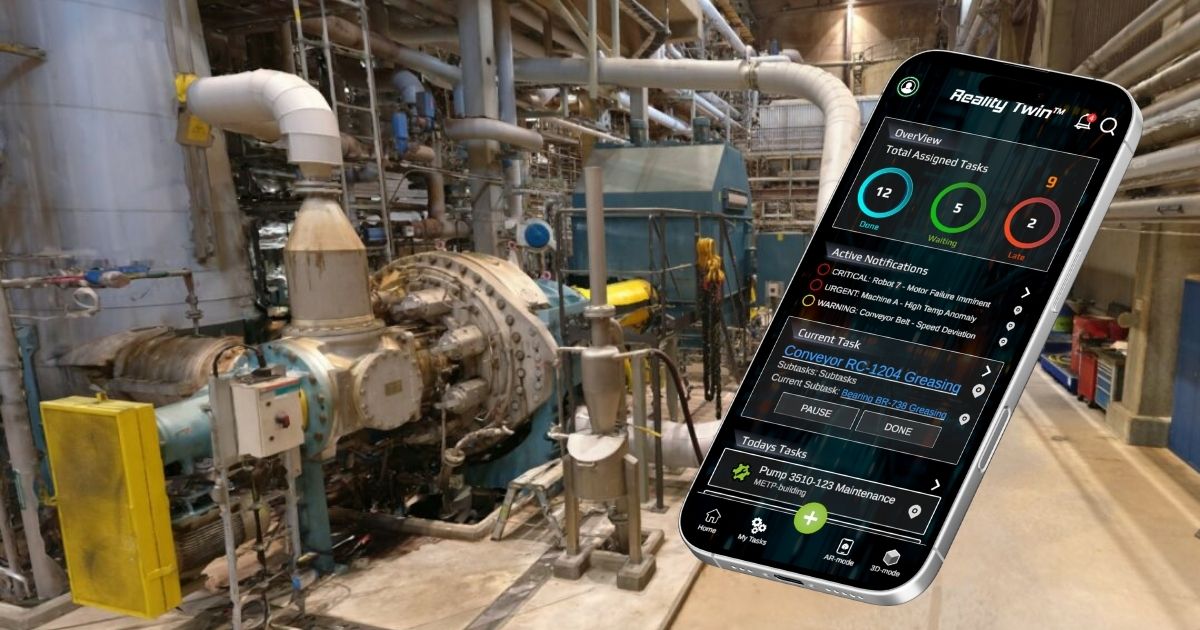
Reality Twin Field brings the digital twin directly into the field for maintenance, safety and production teams. This fully featured mobile application streamlines day-to-day work and extends the value of the digital twin to everyone on site — including those without access to a computer.
A familiar scenario on the night shift
Maintenance technician Jari noticed something odd during his night shift, just two days before his Christmas break: a metallic “klonk” sound whenever the load changed. Not enough to stop production, but enough to trouble an experienced ear.
He walked to the location, listened, took two photos and left a note for the control room: “Feedwater and chemical dosing area. Strange noise near the feed pumps when the load changes. Monitor.”
The morning shift found the note. But “near the feed pumps” essentially meant a long corridor with several look-alike pump assemblies. The sound wasn’t present at that moment. One person went to check. Then another. Eventually someone phoned Jari, who tried to recall whether it had been the first or second pump. Upper platform or lower? After the railing or before?
That night, the noise returned and the same cycle began again. When the team finally decided to perform a detailed inspection, a new obstacle appeared: “Which torque table applies to this equipment version — and where is it?”
One technician was sure he had seen it… somewhere.
Industrial organisations frequently struggle with fragmented information scattered across maintenance systems, document repositories, shared drives, paper folders and people’s memories. Fieldwork moves at a pace where every delay incurs a cost. Information should therefore be quick to find and unambiguous to use.
Breakdowns in communication between shifts, teams and roles create additional friction. One person makes an observation, another verifies it, a third decides how to proceed.
These are exactly the kinds of situations that Reality Twin Field is designed to solve: connecting observations, instructions and missing pieces of information to real-world locations, ensuring that every shift retains an accurate situational picture — and that work progresses smoothly, even during the holiday season.
What Reality Twin Field does in practice
Reality Twin Field is the mobile extension of SolidComp’s Reality Twin platform, bringing the digital twin and asset-specific information directly to the point of work.
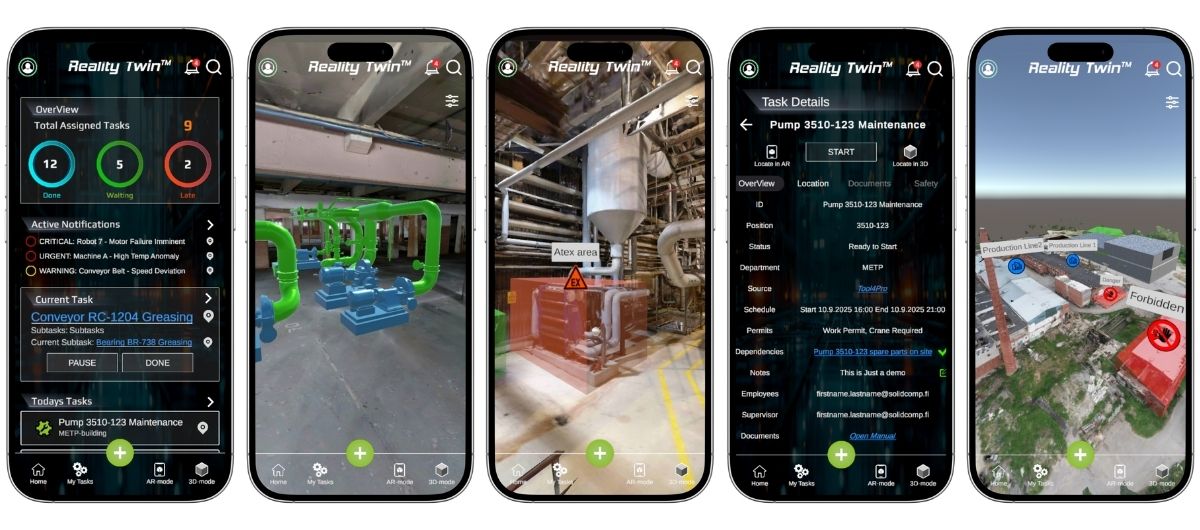
A field user opens the Reality Twin environment on their phone, locates the asset, accesses all linked documentation and records the necessary information. An audit trail is created automatically.
The key is that information and observations are managed consistently and by location. When a photo, note and precise position are captured together, the next user immediately sees what was observed, where and when. The same applies to instructions and attachments: once they are linked to the asset, they appear in the correct context — not as the result of uncertain searches.
Field users can also access personal task lists and navigation to the correct equipment. When a task is completed, it can be marked as done with additional notes and the technician can move straight to the next item.
Reality Twin Field is not intended to replace maintenance management systems (CMMS) or document repositories. Its role is to serve as an easy-to-use interface to the factory’s data so that information becomes usable at the moment and the place where work is decided and carried out.
The right information for the right people — not everything for everone
Field use of Reality Twin does not mean unrestricted access to all site information. Reality Twin supports robust user, data and access control, enabling role- and task-specific views.
When a user opens an asset in the Field App, they see only the information they are authorised and meant to access. Maintenance may see instructions and attachments; safety personnel see safety-ritical documentation and requirements; contractors see only their assigned work area and the documents relevant to them.
Access control can be tied to plant, area, equipment or document type. This ensures quick access to usable information while preventing confidential or irrelevant data from reaching the wrong roles.
When users do not need to sift through everything, they find what they need significantly faster, while the organisation retains control over what information is shared, with whom, and under what principles.
Isolation instructions in your pocket
Reality Twin’s optional isolation tool brings Isolation instructions directly into the field and supports step-by-step execution. The workflow (creator–validator–publisher–user), acknowledgements and traceability can all be configured per customer.
Responsibilities remain clear: the customer is responsible for the content of the instructions and the safety process, while SolidComp provides the technical implementation and onboarding of the tool within the agreed scope.
Gaussian Visuals now in the Field App
Gaussian Visuals adds a photo-realistic 3D view to the Field App, removing ambiguity. It improves orientation, asset recognition and shared situational awareness across shifts and teams.
Three core user journeys
Reality Twin Field places the digital twin in the pocket of everyone who needs it, without requiring a computer. Its features support three main field-level use cases:
Maintenance
When a maintenance technician opens the app, they first see their assigned tasks, which can be completed and acknowledged during the shift. In Reality Twin, asset-linked instructions and attachments are instantly accessible. If the technician notices a deviation — noise, vibration, leakage, heat — they record the observation directly to the asset’s location. The next shift no longer has to guess what “near the pumps” meant; the precise context is preserved.
Contractors and production
External contractors can be provided with a restricted, task-pecific view of the site. This reduces questions, phone calls and misunderstandings, as situational awareness and documentation are correctly scoped and tied to precise locations.
Safety and operations guidance
When instructions are available per asset and accessible during the work itself, safe practices become standardised. Fild personnel no longer rely on “this is how we’ve always done it,” but on a consistent, location-based method for carrying out and documenting work.
Streamlining fieldwork produces measurable benefits
The value of the Field App comes from reducing unnecessary intermediate steps in fieldwork. When the asset is easy to locate, information opens in the correct equipment context, and observations remain tied to location, less time is spent searching, confirming or duplicating work.
Measuring the impact of the tool is best anchored in a few before–after observations, such as:
- time spent searching for information (instructions, attachments, correct asset)
- number of times the same asset is visited for “confirmation” before work begins
- speed at which deviations move from observation to handling and acknowledgement
- number of documentation gaps identified vs. resolved each month
Getting started: what is required?
A successful deployment begins with clear scope definition. A nominated administrator and defined user roles (maintenance, safety, contractors where applicable) are required, along with shared practices for what is recorded, how observations are made and which attachments are critical.
Because data lives across multiple systems, access to agreed data sources and customer-pecific configuration are essential. Reality Twin functions as the visualisation layer that links this information into a single view. Supported integrations include Maximo, SAP and M-Files; these are configured per site, with identifiers, hierarchies, permissions and linking rules aligned to the customer’s operational reality.
A strong pilot focuses on one critical process area and one clear use case, such as “rounds and observation logging” or “making documentation gaps visible and correcting them”. Once the core workflow is validated, expansion to additional areas and roles is smooth and controlled.
Next step: a targeted field pilot and a demo
We recommend beginning with a four-week pilot, selecting a critical process area, assigning 1–2 teams as pilot users, and agreeing on precise metrics for improvement (e.g., inspection duration, wasted time, turnaround times, number of documentation gaps).
The pilot includes a minimal complete setup: selected assets, linked critical attachments and an agreed observation model. As results, the pilot gives information on example what integrations should be enabled to bring immediate value.
Read more about Reality Twin Field in our web page
Want to know more?
Book a demo, and we will propose an optimal pilot scope for your facility and show you in practice what the workflow looks like from a field perspective: Locate asset → open information → document → make gaps visible for the next shift.
Subscribe to SolidComp’s Newsletter
Receive a newsletter from SolidComp about once a month. In it, we share the latest updates from the industry, SolidComp, and the SolidComp Reality Twin.
Subscribe newsletter